iOS 26 Beta has officially entered public testing, bringing a host of cool new tools and improvements to iPhones that are ready for the future. From camera upgrades to system-wide enhancements, Apple is promising an engaging and reliable experience for testers. In this blog, we’ll dive into what’s new, spotlight photo upgrades, and explain compatibility across devices.
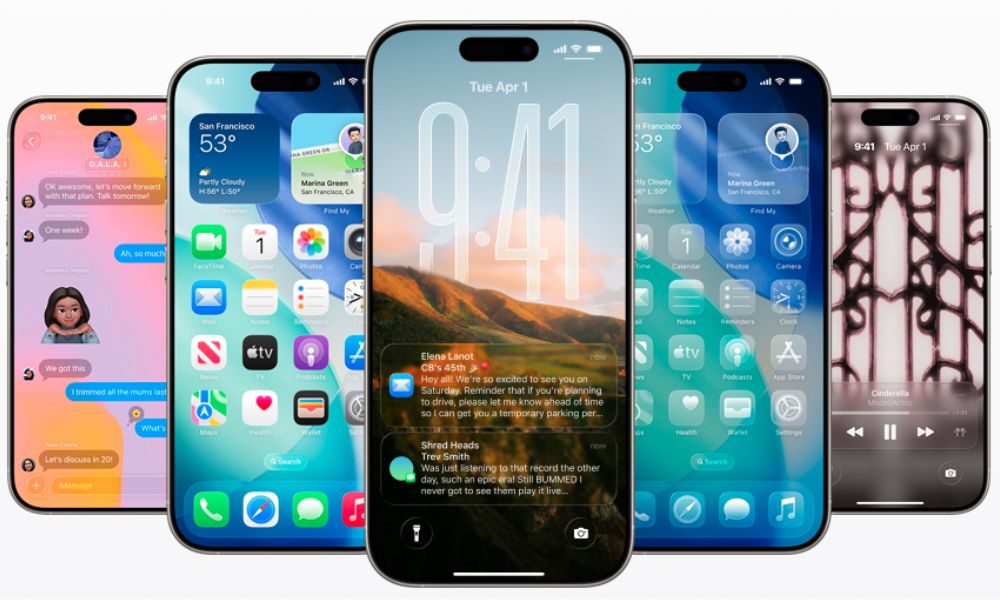
As feedback rolls in, each update, like iOS 26 Beta 3 and 4, brings essential fixes, refinements, and fresh features. We’ll break down the standout improvements, highlight the enhanced iOS 26 photo features, and cover everything you need to know about eligibility and next steps in testing this exciting release.
What’s New in iOS 26 Update?
Apple’s public iOS 26 Beta launches with several big changes that improve usability and enrich the everyday iPhone experience. Right from notifications to privacy settings, there’s something for everyone.
- Smart Notification Summary: A redesigned Summary ties your alerts to specific focus modes. It’s a sleek, smarter way to stay informed without distractions.
- Updated App Library: The App Library now uses intelligent categories and a refined layout to help you find apps faster.
- Live Activity Widget Enhancements: Track sports, rideshares, or workouts with improved animation and glanceable updates.
These improvements build the core of what’s new in iOS 26, delivering a more polished and intuitive operating environment.
Deep Dive: iOS 26 Beta 3 & 4 Features
iOS 26 Beta 3 Features
Released in July, it features a focus heavily on camera app enhancements and visual polish:
- Refined camera UI: Streamlined controls, menus, and sliders make the camera app more intuitive.
- Quick filters: Easily switch between photo styles without leaving the main screen.
- Enhanced portrait lighting: More natural depth effects and stronger edge separation around faces.
These updates reflect Apple’s commitment to powerful yet accessible photo tools.
iOS 26 Beta 4 Features
Built on the feedback from beta 3, iOS 26 Beta 4 features bring both refinement and utility:
- Grid sliders in Camera settings: Fine-tune exposure and focus more precisely.
- Faster downloads: Public testers report smaller update sizes and quicker installations.
- Performance tweaks: Smoother scrolling, fewer hitches, and overall stability improvements.
Between beta stages, it’s clear: Apple is methodically stepping up the iPhone experience.
Spotlight: iOS 26 Photo Features
Photography is a major highlight of iOS 26 Beta, with new tools designed to empower both casual shooters and pros:
- Pro-level Controls with Ease: Access manual exposure and real-time histogram through the enhanced camera interface, no extra apps needed.
- Live Photo Editing: Now you can edit Live Photos directly in the Camera app: crop, remove blur, or add adjustments on the fly.
- AI-powered suggestions: The system suggests better framing, lighting conditions, and portrait setups as you point your iPhone, powered by on-device intelligence.
Combined with smoother face detection and faster filters, iOS 26’s photo features bring iPhone photography to a new level.
Compatible Devices: Which iPhones Can Use iOS 26 Beta?
Before you download, here’s a quick guide to iOS 26-compatible iPhones. Your device must support the public beta:
- iPhone 15 Pro / Pro Max
- iPhone 15 / 15 Plus
- iPhone 14 Pro / Pro Max
- iPhone 14 / 14 Plus
- iPhone 13 Pro / Pro Max
- iPhone 13 / 13 mini
- iPhone 12 series
- iPhone 11 series
- iPhone SE (2nd generation and newer)
Support spans from the latest hardware back to iPhone 11, ensuring most users can test the iOS 26 Beta. If you own one of these devices, enrolling in the beta program is straightforward via Apple’s Beta Software Program portal.
How to Install & Provide Feedback
Ready for action? Here’s how to get upgraded Beta on your iPhone and play a part in shaping the final release:
- Back up your iPhone: Use iCloud or Finder to secure your data.
- Enroll in the Apple Beta Software Program: Visit the official website and sign in with your Apple ID.
- Download the profile: After enrolling, go to Settings → General → VPN & Device Management to install the beta profile.
- Install updates: Navigate to Settings → Software Update to get iOS 26 Beta. The latest is typically beta 4.
- Submit feedback: Use the Feedback Assistant to report bugs, suggest improvements, or share your thoughts.
As updates roll out, especially noted in iOS 26 Beta 3 and 4 features, your input helps Apple polish across camera, interface, and performance areas.
Getting the Most Out of iOS 26
In short, what’s new in iOS 26 marks a big step forward. The iOS 26 Beta delivers real improvements in camera functionality, interface refinements, and system reliability. From photo features designed for everyday and pro shooters to iterative changes tracked through beta 3 and beta 4, this update stands out as both practical and powerful.
If you own any of the supported iOS 26 compatible iPhones, joining the public beta offers early access and a chance to shape the final release, whether you’re chasing pro camera tools or just a smoother iPhone experience. Let us know which feature you’re most excited about and how iOS 26 is performing on your device!